> ## Documentation Index
> Fetch the complete documentation index at: https://sadaa-docs.actualize.ae/llms.txt
> Use this file to discover all available pages before exploring further.
# Platform Overview
> Enterprise-grade Conversational AI Platform for Seamless Customer Interactions
Sadaa is your comprehensive AI communication platform that unifies voice, chat, and document processing capabilities into a single, powerful solution designed for enterprise needs.
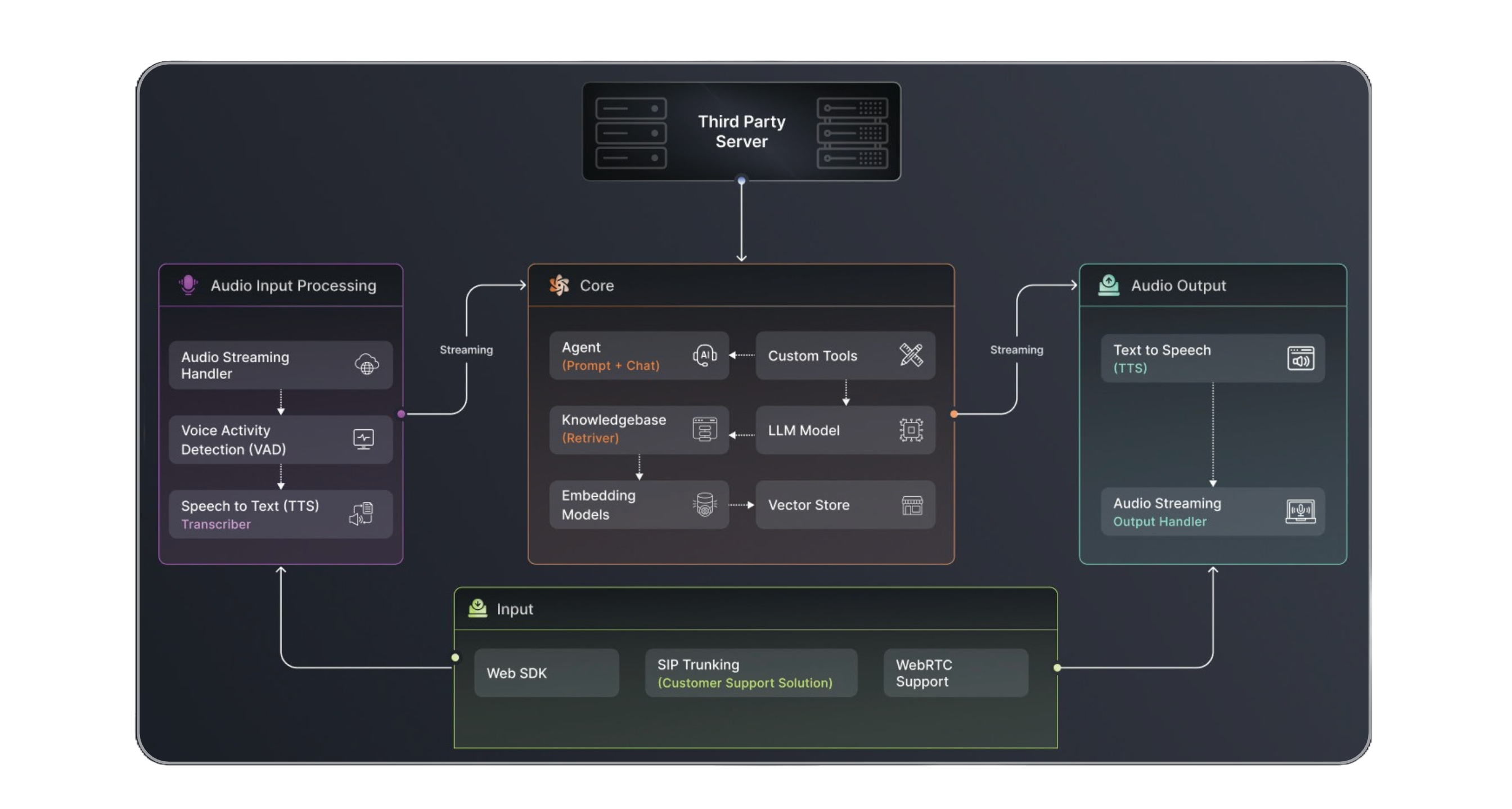 ## Platform Architecture
Sadaa's architecture is built on three robust pillars, each designed to handle specific aspects of your communication needs:
### Core Components
Handles real-time chat interactions and message routing across multiple channels
Manages voice communications with advanced speech processing capabilities
Centralizes and processes your organization's information and documents
## Key Features
Deploy once, engage everywhere - voice, chat, WhatsApp, and more
Process and understand documents, PDFs, and structured content
Connect your business knowledge for more intelligent interactions
Natural voice interactions with emotion detection and custom voices
Process and respond to queries in real-time with low latency
Security, compliance, and scalability built for enterprise needs
## Platform Overview
LocAI AI Platform consists of three powerful core components that work seamlessly together:
### 🤖 Conversational AI Engine
Build intelligent agents that can:
* Engage in natural conversations across voice and chat
* Handle complex workflows and business logic
* Integrate with your existing systems and databases
* Support multiple languages and dialects
### 📱 Multi-Channel Support
Meet your users where they are:
* Voice calls (inbound and outbound)
* WhatsApp
* Web chat
* WebRTC for real-time communication
* Custom channel integration capabilities
### 🧠 Knowledge & Document Intelligence
Empower your agents with:
* Intelligent document processing and analysis
* PDF parsing and content extraction
* Dynamic knowledge base integration
* Real-time information retrieval
### Integration Channels
Sadaa provides multiple communication channels to reach your customers:
* **Voice Calls**: Direct integration with telephony systems
* **WhatsApp**: Enterprise-grade WhatsApp Business API integration
* **WebRTC**: Real-time web communications
* **Custom Channels**: Extensible architecture for additional channels
## Platform Architecture
Sadaa's architecture is built on three robust pillars, each designed to handle specific aspects of your communication needs:
### Core Components
Handles real-time chat interactions and message routing across multiple channels
Manages voice communications with advanced speech processing capabilities
Centralizes and processes your organization's information and documents
## Key Features
Deploy once, engage everywhere - voice, chat, WhatsApp, and more
Process and understand documents, PDFs, and structured content
Connect your business knowledge for more intelligent interactions
Natural voice interactions with emotion detection and custom voices
Process and respond to queries in real-time with low latency
Security, compliance, and scalability built for enterprise needs
## Platform Overview
LocAI AI Platform consists of three powerful core components that work seamlessly together:
### 🤖 Conversational AI Engine
Build intelligent agents that can:
* Engage in natural conversations across voice and chat
* Handle complex workflows and business logic
* Integrate with your existing systems and databases
* Support multiple languages and dialects
### 📱 Multi-Channel Support
Meet your users where they are:
* Voice calls (inbound and outbound)
* WhatsApp
* Web chat
* WebRTC for real-time communication
* Custom channel integration capabilities
### 🧠 Knowledge & Document Intelligence
Empower your agents with:
* Intelligent document processing and analysis
* PDF parsing and content extraction
* Dynamic knowledge base integration
* Real-time information retrieval
### Integration Channels
Sadaa provides multiple communication channels to reach your customers:
* **Voice Calls**: Direct integration with telephony systems
* **WhatsApp**: Enterprise-grade WhatsApp Business API integration
* **WebRTC**: Real-time web communications
* **Custom Channels**: Extensible architecture for additional channels
.gif) * PostgreSQL for relational data
* MongoDB for document storage
* Redis for caching
* S3-compatible storage for files
* Distributed message processing
* Real-time event handling
* Automated scaling
* Load balancing
* RESTful APIs
* WebSocket support
* Webhook integrations
* Custom connector support
## Getting Started
1. **Platform Access**: Contact your account manager for credentials
2. **Environment Setup**: Configure your development environment
3. **Integration**: Choose your preferred integration method
4. **Testing**: Access our staging environment
5. **Deployment**: Move to production with our support
Start with our quick setup guide →
## Support and Resources
* Technical documentation
* API references
* Integration guides
* Best practices
* Support channels
Contact your dedicated support team for any assistance during implementation.
* PostgreSQL for relational data
* MongoDB for document storage
* Redis for caching
* S3-compatible storage for files
* Distributed message processing
* Real-time event handling
* Automated scaling
* Load balancing
* RESTful APIs
* WebSocket support
* Webhook integrations
* Custom connector support
## Getting Started
1. **Platform Access**: Contact your account manager for credentials
2. **Environment Setup**: Configure your development environment
3. **Integration**: Choose your preferred integration method
4. **Testing**: Access our staging environment
5. **Deployment**: Move to production with our support
Start with our quick setup guide →
## Support and Resources
* Technical documentation
* API references
* Integration guides
* Best practices
* Support channels
Contact your dedicated support team for any assistance during implementation.