

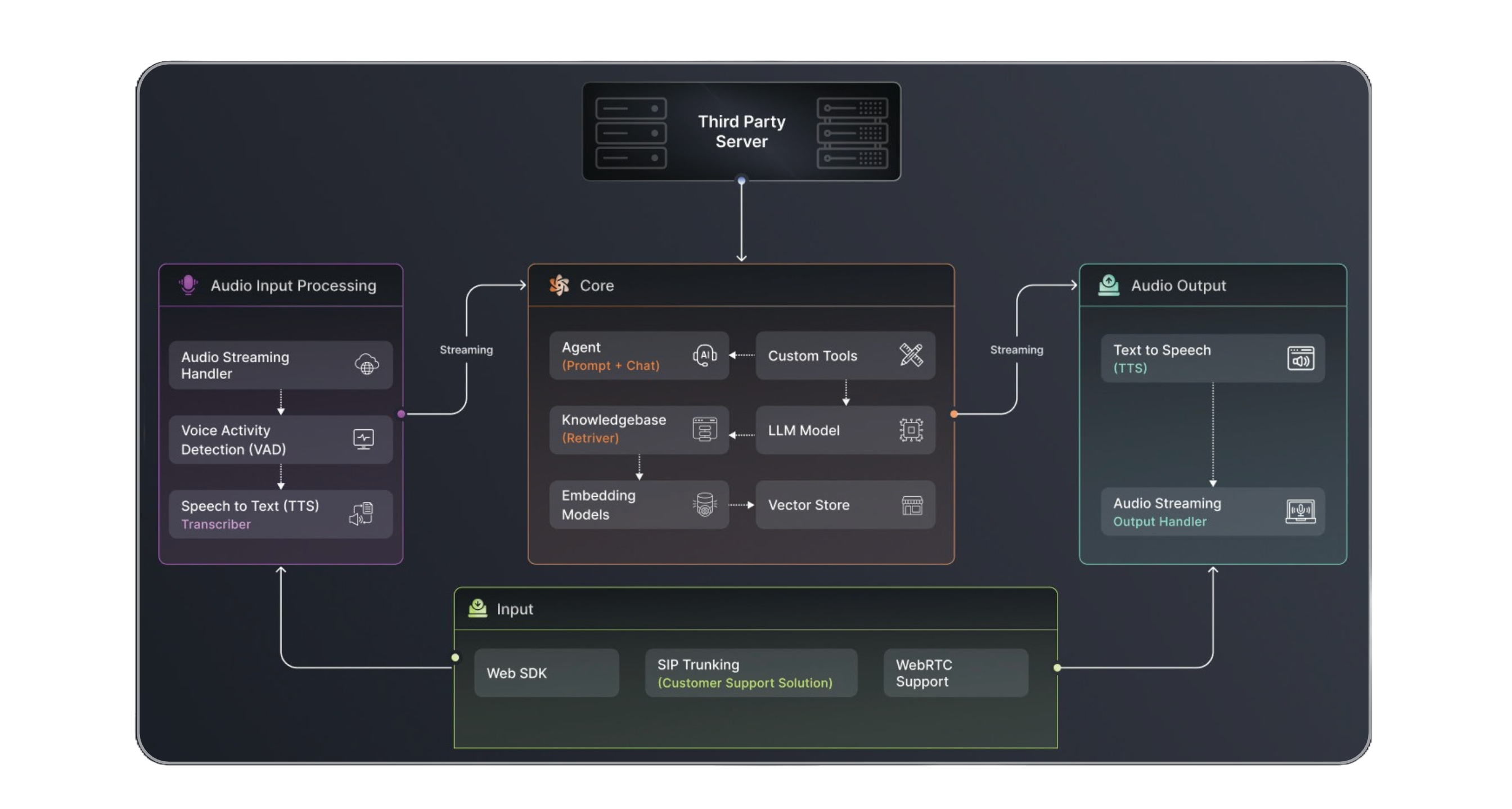
Platform Architecture
Sadaa’s architecture is built on three robust pillars, each designed to handle specific aspects of your communication needs:Core Components
Chat Engine API
Handles real-time chat interactions and message routing across multiple channels
Voice API
Manages voice communications with advanced speech processing capabilities
Knowledge Base
Centralizes and processes your organization’s information and documents
Key Features
Omnichannel Support
Deploy once, engage everywhere - voice, chat, WhatsApp, and more
Document Intelligence
Process and understand documents, PDFs, and structured content
Knowledge Integration
Connect your business knowledge for more intelligent interactions
Advanced Voice AI
Natural voice interactions with emotion detection and custom voices
Real-time Processing
Process and respond to queries in real-time with low latency
Enterprise Ready
Security, compliance, and scalability built for enterprise needs
Platform Overview
LocAI AI Platform consists of three powerful core components that work seamlessly together:🤖 Conversational AI Engine
Build intelligent agents that can:- Engage in natural conversations across voice and chat
- Handle complex workflows and business logic
- Integrate with your existing systems and databases
- Support multiple languages and dialects
📱 Multi-Channel Support
Meet your users where they are:- Voice calls (inbound and outbound)
- Web chat
- WebRTC for real-time communication
- Custom channel integration capabilities
🧠 Knowledge & Document Intelligence
Empower your agents with:- Intelligent document processing and analysis
- PDF parsing and content extraction
- Dynamic knowledge base integration
- Real-time information retrieval
Integration Channels
Sadaa provides multiple communication channels to reach your customers:- Voice Calls: Direct integration with telephony systems
- WhatsApp: Enterprise-grade WhatsApp Business API integration
- WebRTC: Real-time web communications
- Custom Channels: Extensible architecture for additional channels
.gif)
- Storage Layer
- Processing Layer
- Integration Layer
- PostgreSQL for relational data
- MongoDB for document storage
- Redis for caching
- S3-compatible storage for files
Getting Started
- Platform Access: Contact your account manager for credentials
- Environment Setup: Configure your development environment
- Integration: Choose your preferred integration method
- Testing: Access our staging environment
- Deployment: Move to production with our support
Ready to Begin?
Start with our quick setup guide →
Support and Resources
- Technical documentation
- API references
- Integration guides
- Best practices
- Support channels